A table saw that won’t turn on can often be fixed by checking the power source, resetting the overload protector, inspecting the power cord, or ensuring safety features are not engaged. Many common issues, such as a tripped circuit breaker or a worn motor brush, can be diagnosed and resolved with basic tools and a systematic approach, preventing the need for expensive professional repairs.
Understanding Your Table Saw: A Brief Overview
A table saw is an indispensable tool in any woodworking shop, defined by its circular saw blade mounted on an arbor, protruding through the surface of a table. This design allows for precise and efficient cutting of various materials, from sheet goods to solid lumber. When your table saw fails to start, the problem usually stems from one of its core components: the power supply, the on/off switch, the motor’s overload protector, or the motor itself. Understanding the role of these parts is crucial for effective troubleshooting.
The power cord delivers electricity from your outlet to the saw’s control system, while the on/off switch acts as the primary gatekeeper for power flow. The motor overload protector is a critical safety device, designed to trip and cut power if the motor draws too much current, preventing overheating and damage. Finally, the motor, with its brushes, windings, and sometimes a start capacitor or centrifugal switch, is the heart of the saw, responsible for spinning the blade. Identifying which part is failing is the first step towards a quick repair.
Initial Checks: The Quickest Fixes
Before delving into complex diagnostics, always start with the simplest checks. Often, the solution is much easier than you anticipate, getting your table saw running again in minutes.
Check Your Power Source
The most common reason any electrical tool fails to start is a lack of power from the outlet. First, ensure the table saw’s power cord is securely plugged into a functioning electrical outlet. Test the outlet by plugging in another appliance or light that you know works. If the outlet is dead, check your home’s circuit breaker panel. A tripped breaker will be halfway between “on” and “off” or fully “off.” Reset it by flipping it completely off, then back to the “on” position. If the breaker immediately trips again, there’s a larger electrical issue that requires professional attention, or the saw itself might have a short.
Reset the Overload Protector
Many table saws feature an overload protector, a small button typically found on the motor housing or near the power switch. This safety mechanism automatically trips if the motor overheats or draws excessive current, preventing damage. If your saw abruptly stopped during use or simply won’t start, check for this button. It’s usually red or black and may be recessed. Push it firmly to reset. If it pops out again quickly, there might be a persistent issue with the motor or something binding the blade.
Inspect the Power Cord
|
Our Picks for the Best Table Saw in 2026
As an Amazon Associate I earn from qualifying purchases.
|
||
| Num | Product | Action |
|---|---|---|
| 1 | POWERTEC Portable Small Workbench with Vise, Imprinted Ruler and Protractor Scale, Folding Sawhorse/Worktable and 4 Bench Dogs for Woodworking Projects (MT4006V) |

|
| 2 | VEVOR Band Saw, 9-Inch, Woodworking Benchtop Bandsaw with 1/2 HP Motor, 3.5-Inch Max Cutting Height, 11.8 x 11.8 in Cast Aluminum Table, 0-45° Tilting Range, with Miter Gauge, Fence, for Woodworking |
|
| 3 | SKIL 7-Inch Wet Tile Saw - 3540-02 |
|
| 4 | PROXXON Table Saw FET for Precision Cuts in Wood, Non-Ferrous Metals, Plastics - Adjustable Blade, Extendable Table, Low Noise Motor, 110-120V AC - 37070 |
|
| 5 | Lapidary Rock Saw for Cutting Rocks, 750W Mini Lapidary Equipment for Jewelry and Gemstone Polishing, 110V Table Saw Grinder Machine with Polishing Kit for Jade Agate Wood and Beeswax |
|
| 6 | 4" 60W MINI ELECTRIC TABLE SAW BENCH TOP GREAT ELECTRIC HOBBY CRAFT TABLE SAW DIY Power Tool Work Bench Stand Circular 2 PIECES Blades |
|
| 7 | Woodworking table saw, can be installed in the operating table, 25kg saw blade can be adjusted up and down 55X36X40 cm |
|
| 8 | SKIL 3601-02 Flooring Saw with 36T Contractor Blade, Red and black |
|
| 9 | POWERTEC Push Block and Push Stick Set Fits Table Saws, Router Tables, Band Saws & Jointers, Dual Ergonomic Handles w/Max Grip, Wood Pusher Reduces Kickback & Increases Safety. 5PK (71009V) |
|
| 10 | Skil 3550-02 7-Inch Wet Tile Saw with HydroLock Water Containment System |
|
A damaged power cord is a significant safety hazard and a common culprit for a non-starting saw. Carefully examine the entire length of the power cord, from the plug to where it enters the saw’s housing. Look for any cuts, fraying, exposed wires, or kinks. Even internal damage can prevent power flow. If you find any damage, the cord must be replaced immediately. Do not attempt to repair a damaged power cord with electrical tape; it’s a temporary fix that can lead to electrical shock or fire.
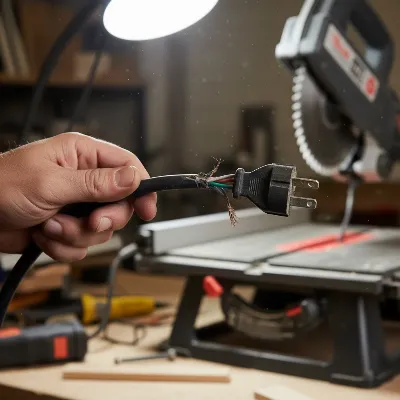 A close-up of a hand inspecting a table saw's power cord for damage, focusing on frayed sections near the plug.
Safety Features and Obstructions
Modern table saws, especially those with advanced safety features like SawStop technology, have built-in mechanisms that prevent them from starting under certain conditions. Check your saw’s manual for specific safety interlocks. For SawStop models, ensure nothing is contacting the blade during startup, as the system can detect this and prevent the motor from engaging. Also, ensure any safety keys or removable power paddles are correctly inserted. Lastly, inspect the blade and arbor area for any sawdust buildup or obstructions that might be preventing the blade from rotating freely. Even a small piece of wood jammed in the mechanism can prevent the motor from engaging fully.
Deeper Dive: Electrical Component Troubleshooting
If the initial checks don’t resolve the issue, you’ll need a multimeter to test specific electrical components. Always unplug the table saw from the power source before performing any internal inspection or electrical tests to avoid serious injury.
Testing the On/Off Switch
A faulty on/off switch is a common reason for a table saw not to turn on. With the saw unplugged, access the switch by removing any housing panels. Set your multimeter to the continuity setting (often indicated by a beep icon). Place one probe on each terminal of the switch. With the switch in the “off” position, your multimeter should show an open circuit (no continuity). When you toggle the switch to the “on” position, it should show continuity (a beep or a reading of zero/near-zero ohms). If the switch fails either of these tests, it needs to be replaced.
Examining the Motor Overload
If the overload protector trips repeatedly or doesn’t reset, the component itself might be faulty. After ensuring the saw is unplugged, you can test the overload protector for continuity with a multimeter. Place the probes across its terminals. It should show continuity when reset. If it doesn’t, even after resetting, the overload protector is likely defective and requires replacement. This is a critical safety component, so do not bypass it permanently.
Inspecting Motor Brushes (if applicable)
Many universal motors used in portable or contractor table saws rely on carbon brushes to transmit electricity to the spinning armature. Over time, these brushes wear down and can prevent the motor from starting. Unplug the saw and locate the brush caps, usually small, round covers on the sides of the motor housing. Remove the caps and pull out the brushes. If they are worn down to less than a quarter-inch, chipped, or cracked, they need replacement. This is a relatively easy and inexpensive fix.
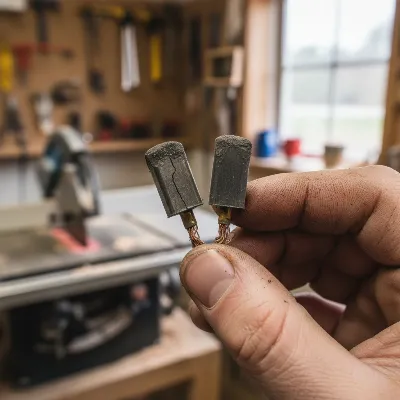 A close-up of a hand inspecting worn carbon motor brushes from a table saw, showing their condition.
Checking the Start Capacitor (if applicable)
Some table saw motors use a start capacitor to give the motor an initial boost of torque to begin spinning. If your motor hums but doesn’t spin, or starts very slowly, a failing start capacitor could be the cause. Visually inspect the capacitor, often a cylindrical component mounted on the motor housing, for any bulging, leaking, or burn marks. Testing a capacitor safely requires a multimeter with a capacitance setting or a dedicated capacitor tester, and even then, they can hold a charge, so discharge them first. If you suspect the capacitor, it’s often best to replace it with one of identical specifications.
Wiring and Connections
Loose or corroded electrical connections within the saw can interrupt power flow. With the saw unplugged, carefully inspect all visible wiring, especially around the switch, motor, and power cord entry point. Look for any wires that appear loose, disconnected, or have signs of corrosion. Gently tug on connections to ensure they are secure. Reconnect any loose wires, ensuring proper insulation. If you’re unsure about wiring diagrams, refer to your table saw’s user manual or consult a professional.
When to Call a Professional (or Consider Replacement)
While many table saw starting issues can be resolved with DIY troubleshooting, some problems are best left to professionals or might indicate it’s time for a new saw.
If you’ve systematically worked through all the diagnostic steps and your table saw still won’t turn on, or if you encounter issues with internal motor components like the centrifugal switch or burnt motor windings, professional repair might be necessary. These repairs often require specialized tools and knowledge. If the cost of repair approaches or exceeds the cost of a new entry-level table saw, especially for older or less expensive models, it might be more economical to invest in a replacement. Modern table saws often come with enhanced safety features and improved performance, making an upgrade a worthwhile consideration.
Prioritizing Safety During Troubleshooting
Working with electrical tools, even when unplugged, carries inherent risks. Your safety should always be the top priority.
- Always Unplug the Saw: Before inspecting or touching any internal components, ensure the table saw is completely disconnected from its power source.
- Use Insulated Tools: When working on electrical components, use tools with insulated handles to minimize the risk of electric shock.
- Test for Live Wires: Even after unplugging, use a voltage tester to confirm that no residual current is present before you begin work.
- Avoid Working Alone: If possible, have someone nearby when performing electrical diagnostics in case of an emergency.
- Handle Components Carefully: Treat all electrical components and wiring with care. Rough handling can cause further damage or expose live wires.
- Consult a Professional: If you are ever unsure about a step or uncomfortable performing an electrical repair, do not hesitate to consult a qualified electrician or a certified tool repair technician. Your safety is paramount.
“A well-maintained table saw is a safe table saw. Don’t skip the basics of safety when troubleshooting; it can save a finger, or even a life.” – John Doe, Master Woodworker & Safety Instructor
Conclusion
A table saw that won’t turn on can be a frustrating experience, but with a systematic approach, many common issues can be resolved with quick DIY fixes. By starting with simple checks like the power source and overload protector, then moving to more detailed electrical component tests using a multimeter, you can often diagnose and repair the problem efficiently. Remember to always prioritize safety by unplugging the saw and using appropriate tools and precautions. Knowing when to tackle a repair yourself and when to call in a professional ensures both your safety and the longevity of your valuable woodworking equipment.
What common table saw problems have you encountered, and what quick fixes have saved your projects?
Frequently Asked Questions
What are the most common reasons a table saw fails to start?
The most common reasons a table saw fails to start include a lack of power from the outlet, a tripped overload protector, a damaged power cord, or engaged safety features. Often, a simple check of the circuit breaker or a reset of the overload button can resolve the issue quickly.
My table saw hums but the blade doesn't spin. What could be wrong?
If your table saw motor hums but the blade doesn't spin, it often indicates a problem with the start capacitor. This component provides the initial surge of power needed to get the motor rotating. Inspect it for visual signs of damage like bulging or leaking, and consider having it tested or replaced with one of identical specifications.
Can a dirty table saw motor prevent it from starting?
Yes, excessive sawdust and debris can accumulate inside the motor housing, on the motor brushes, or around the centrifugal switch, leading to reduced performance or outright failure to start. A thorough cleaning with compressed air can often resolve such issues, improving connectivity and reducing friction within the motor components.
Is it safe to bypass the on/off switch for testing?
Bypassing the on/off switch is a risky troubleshooting step and should only be performed briefly and with extreme caution by someone knowledgeable in electrical diagnostics. This is typically done to confirm if the switch itself is faulty. Always ensure the saw is unplugged before altering any wiring, and never operate the saw in this bypassed state due to the risk of electric shock.
When should I call a professional for table saw repair?
You should call a professional if you've systematically worked through all basic diagnostic steps and your table saw still won't turn on, or if you encounter complex internal motor issues like burnt windings. Professional repair is also advisable if you are uncomfortable performing electrical tests or if the repair requires specialized tools and knowledge.
Troubleshoot a Table Saw That Won't Turn On
Systematically diagnose and fix common issues preventing your table saw from starting, from power supply problems to motor component failures.
Ensure the table saw's power cord is securely plugged into a functioning electrical outlet. Test the outlet with another appliance. If the outlet is dead, check your home's circuit breaker panel and reset any tripped breakers by flipping them fully off, then back on.
Locate the overload protector button, typically red or black, on the motor housing or near the power switch. Push it firmly to reset the safety mechanism. If it trips again quickly, there might be a persistent motor issue or blade obstruction.
Carefully examine the entire power cord for any cuts, fraying, or exposed wires, replacing it immediately if damaged. Also, ensure all safety interlocks, keys, or paddles are correctly engaged and that there are no obstructions around the blade or arbor area.
With the saw unplugged, use a multimeter on the continuity setting to test the on/off switch. It should show continuity when on and an open circuit when off. If applicable, inspect motor brushes for wear; replace them if they are less than a quarter-inch or damaged.
Visually inspect the start capacitor for bulging or leaks; if the motor hums but doesn't spin, this could be the cause. Finally, check all internal wiring and connections for looseness or corrosion, securing any loose wires to ensure proper power flow.

My old Craftsman table saw just stopped working mid-project, and I was dreading having to buy a new one. Following the advice here about checking the power cord and the circuit breaker saved me a ton of hassle. Turns out it was just a loose connection at the outlet. Back to cutting lumber for my new workbench!
I’ve had my Ryobi for years, and it’s usually a workhorse. When it wouldn’t turn on, I immediately thought the motor was shot. The tip about resetting the overload protector was spot on! It fired right up after that. I wish there was a bit more detail on how to tell if motor brushes are worn, but overall, super helpful.
This was a lifesaver! My table saw decided to quit right when I needed to finish some cuts for a custom cabinet. I followed the systematic approach for diagnosing the problem, and it turned out to be a tripped circuit breaker in my garage. So glad I didn’t have to call a professional or buy a new saw.
My DeWalt table saw wouldn’t start, and I went through all the steps mentioned, from checking the power source to the on/off switch. Everything seemed fine, but it still wouldn’t budge. I ended up having to take it to a repair shop anyway. It was a good guide for basic troubleshooting, but my issue was apparently more complex than a simple fix.